Enbrel
Product Images NDC 50090-3531

View Photos of Packaging, Regulatory Labels, and Product Appearance

Product Visual Gallery

This gallery contains 100 technical images submitted to the FDA as part of the official labeling for Enbrel (NDC 50090-3531). Unlike standard consumer photos, these assets often include clinical data figures, molecular chemical structures, and official manufacturer packaging layouts.

As provided by A-s Medication Solutions, these visuals offer a comprehensive scientific overview of the product's physical and chemical identity, aiding pharmacists and researchers in product verification and study.

Product Images & Figures Index

FDA Label Image

Enbrel 01

Enbrel 01
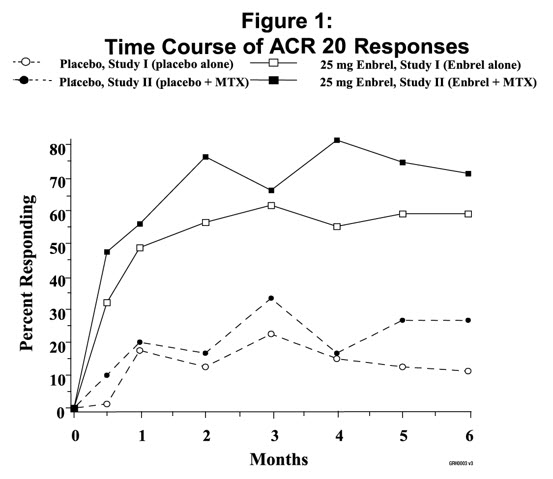
The text describes a figure showing the time course of ACR 20 responses in two different studies. The first study compares a placebo alone to a 25 mg dose of Enbrel alone. The second study compares a placebo plus MTX to a combination of 25 mg Enbrel and MTX. The figure measures the percent responding over time.*
FDA Label Image

Figure 1 (Enbrel 02)

Figure 1 (Enbrel 02)
The data shows the percentage of respondents who reacted to the treatment with methotrexate compared to the placebo. The only visible value is "100" which could imply that all respondents reacted to the treatment, but further information is required to confirm this.*
FDA Label Image

Figure 2. Asas 20 Responses In Ankylosing Spondylitis (Enbrel 03)

FDA Label Image

Enbrel 04

FDA Label Image

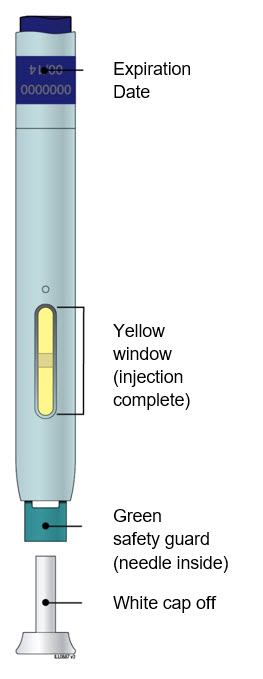
Guide To Parts (Enbrel 05)

Guide To Parts (Enbrel 05)
The text appears to be a partial list of features or parts related to a medical device, potentially a needle or syringe. It includes a purple start button, an expiration date, a window, and a safety guard for a needle. However, the context and purpose of this device is unclear based on this limited information.*
FDA Label Image

B Inspect The Enbrel Sureclick Autoinjector. (Enbrel 06)

B  Inspect The Enbrel Sureclick Autoinjector. (Enbrel 06)
This appears to be a label or package information for a medical injection device. It mentions the expiration date of the product and indicates that the injection is complete when the yellow window is filled. It also highlights a green safety guard that encloses the needle after the injection and a white cap that needs to be removed before using the device.*
FDA Label Image

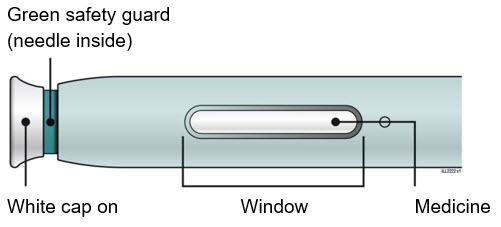
New Autoinjector Alcohol Wipes Cotton Ball Or Gauze Pad Adhesive Bandage Sharps Disposal Container. “step 4: Finish” (Enbrel 07)

New Autoinjector Alcohol Wipes Cotton Ball Or Gauze Pad Adhesive Bandage Sharps Disposal Container. “step 4: Finish” (Enbrel 07)
This text appears to describe a green safety guard that contains a needle inside. It also mentions a white cap being present. The context in which these objects are mentioned is unclear as the text is incomplete. The text ends abruptly with the words "Window" and "Medicine," which may or may not be related to the previous content.*
FDA Label Image

D Prepare And Clean Your Injection Site. (Enbrel 08)

FDA Label Image

E Pull White Cap Straight Off When You Are Ready To Inject. (Enbrel 09)

E  Pull White Cap Straight Off When You Are Ready To Inject. (Enbrel 09)
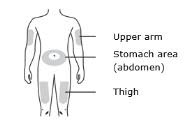
This text provides a list of three body parts: the upper arm, stomach area (abdomen), and thigh.*
FDA Label Image

Window Turns Yellow When Injection Is Done (Enbrel 10)

FDA Label Image

Enbrel 100

FDA Label Image

Enbrel 101

Enbrel 101
This appears to be incomplete and unreadable output. Hence, the description cannot be generated.*
FDA Label Image

Enbrel 102

FDA Label Image

Enbrel 103

FDA Label Image

Enbrel 104

FDA Label Image

Enbrel 105

FDA Label Image

Enbrel 106

Enbrel 106
This appears to be a list of features for a device or product, possibly a door or lock system. It includes a finger grip, door button, and viewing window as notable features of the product.*
FDA Label Image

Enbrel 107

FDA Label Image

Enbrel 108

Enbrel 108
This appears to be a list of five different components or features, but without any context or additional information, it is not possible to provide a useful description of what they are or what they are used for.*
FDA Label Image

Enbrel 109

FDA Label Image

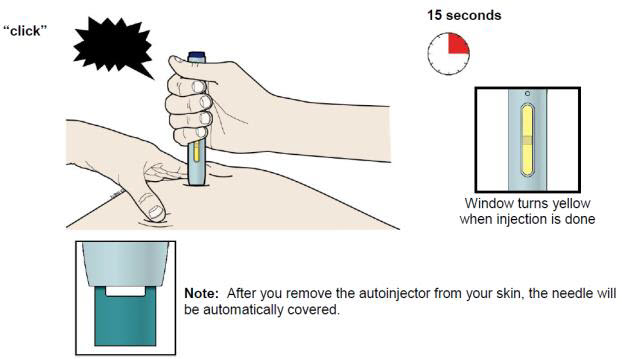
Note: After You Remove Autoinjector From Your Skin, The Needle Will Be Automatically Covered. (Enbrel 11)

FDA Label Image

Enbrel 110

Enbrel 110
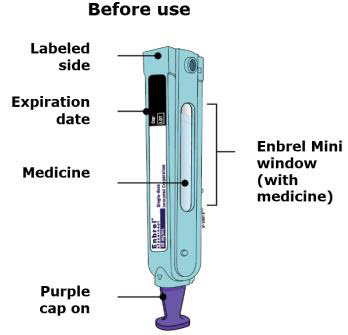
The text seems to be a set of instructions or information about a medication called Enbrel Mini. It indicates that the medication should only be used after checking the labeled side and expiration date. Additionally, there seems to be a purple cap on the medication container. However, there is a random string of non-English characters present in the text.*
FDA Label Image

Enbrel 111

Enbrel 111
This is a brief instruction for Enbrel Mini, a medication that comes with a purple cap. The text reminds the user that the needle needed to administer the medication is inside the Enbrel Mini and that the cap needs to be taken off before use. There is no mention of the actual medication.*
FDA Label Image

Enbrel 112

Enbrel 112
The text describes a plunger rod which is not further explained. The second part mentions Enbrel Mini® which is a single-dose prefilled cartridge that is loaded.*
FDA Label Image

Enbrel 113

FDA Label Image

Enbrel 114

FDA Label Image

Enbrel 115

FDA Label Image

Enbrel 116

FDA Label Image

Enbrel 117

FDA Label Image

Enbrel 118

FDA Label Image

Enbrel 119

FDA Label Image

K Discard The Used Autoinjector And The White Cap. (Enbrel 12)

FDA Label Image

Enbrel 120

FDA Label Image

Enbrel 121

FDA Label Image

Enbrel 122

FDA Label Image

Enbrel 123

FDA Label Image

Enbrel 124

FDA Label Image

Enbrel 125

FDA Label Image

Enbrel 126

FDA Label Image

Enbrel 127

FDA Label Image

Enbrel 128

FDA Label Image

Enbrel 129

FDA Label Image

6. Hold The Prefilled Syringe With The Covered Needle Pointing Down. If Bubbles Are Seen In The Syringe, Very Gently Tap The Prefilled Syringe To Allow Any Bubbles To Rise To The Top Of The Syringe. Turn The Syringe So That The Purple Horizontal Lines On The Barrel Are Directly Facing You. Check To See If The Amount Of Liquid In The Syringe Falls Between The Purple Lines. The Top Of The Liquid May Be Curved. If The Syringe Does Not Have The Right Amount Of Liquid, Do Not Use That Syringe. Contact Your Pharmacist Or Call 1-888-4enbrel (1-888-436-2735) For Assistance. (Enbrel 13)

FDA Label Image

Enbrel 130

FDA Label Image

Enbrel 131

FDA Label Image

Enbrel 132

Enbrel 132
This text provides the names of three body parts: Upper arm, stomach area (abdomen), and thigh. It can be useful for identifying and describing these areas during medical examinations and discussions.*
FDA Label Image

Enbrel 133

FDA Label Image

Enbrel 134

FDA Label Image

Enbrel 135

FDA Label Image

Enbrel 136

FDA Label Image

Enbrel 137

FDA Label Image

Enbrel 138

Enbrel 138
This text describes the features of an unknown object, including a finger grip, a door button, a viewing window, and a door. Without additional context, it is impossible to determine the specific object being described.*
FDA Label Image

Enbrel 139

FDA Label Image

Step 2: Choosing And Preparing An Injection Site (Enbrel 14)

Step 2: Choosing And Preparing An Injection Site (Enbrel 14)
This is a description of a green safety guard that appears to contain a needle inside. No further information is available.*
FDA Label Image

Enbrel 140

Enbrel 140
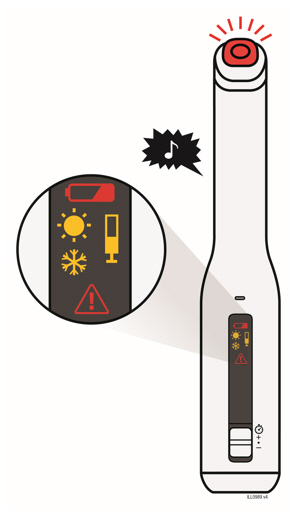
This is a list of components likely found in a software or hardware user interface. It includes a status button, speaker, error symbols, progress bar, and speed switch. No additional context or information is available.*
FDA Label Image

Enbrel 141

FDA Label Image

Enbrel 142

Enbrel 142
This is the packaging of a medicine called Enbrel Mini. The label indicates the side where the medicine is to be injected. There is an expiration date on the package, and it has a purple cap. The package has a window which allows the user to see the medicine inside the container.*
FDA Label Image

Enbrel 143

Enbrel 143
This text seems to be a partial instruction for the use of Enbrel Mini product. It is recommended to remove the purple cap from the medicine and there is a warning that the needle is inside. There is also a mention of a window without medicine in the Enbrel Mini. However, without further context, it is impossible to determine what Enbrel Mini is used for.*
FDA Label Image

Enbrel 144

Enbrel 144
The text is not enough to generate a useful description. It only includes the label "cartridge" with the added word "(loaded)". More context is needed to provide a relevant description.*
FDA Label Image

Enbrel 145

FDA Label Image

Enbrel 146

FDA Label Image

Enbrel 147

FDA Label Image

Enbrel 148

FDA Label Image

Enbrel 149

FDA Label Image

4. With A Quick And “dart Like” Motion, Insert The Needle At A 45 Degree Angle Into The Skin. (Enbrel 15)

FDA Label Image

Enbrel 150

FDA Label Image

Enbrel 151

FDA Label Image

Enbrel 152

FDA Label Image

Enbrel 153

FDA Label Image

Enbrel 154

FDA Label Image

Enbrel 155

FDA Label Image

Enbrel 156

FDA Label Image

Enbrel 157

FDA Label Image

Enbrel 158

FDA Label Image

Enbrel 159

FDA Label Image

One Prefilled Diluent Syringe Containing 1 mL Of Diluent (liquid) With Attached Adapter And Twist Off Capone Plungerone Enbrel Vialone 27 Gauge ½ Inch Needle In Hard Plastic Coverone Vial Adapter (Enbrel 16)

FDA Label Image

Enbrel 160

FDA Label Image

Enbrel 161

FDA Label Image

Enbrel 162

FDA Label Image

Enbrel 163

FDA Label Image

Enbrel 164

FDA Label Image

Enbrel 165

FDA Label Image

Enbrel 166

FDA Label Image

Enbrel 167

Enbrel 167
This appears to be a guide for using a medicine injection. The purple start button initiates the injection process, and there are markings indicating an expiration date. The yellow window helps the user confirm when the injection is complete. The medicine is protected by a green safety guard and has a white cap that can be removed. The guide notes that the needle is inside and emphasizes the importance of taking care when handling it.*
FDA Label Image

Enbrel 168

FDA Label Image

Enbrel 169

FDA Label Image

1. Remove The Pink Plastic Cap From The Enbrel Vial. Do Not Remove The Gray Stopper Or Silver Metal Ring Around The Top Of The Enbrel Vial. (Enbrel 17)

FDA Label Image

Enbrel 170

Enbrel 170
This is not available.*
FDA Label Image

Enbrel 171

FDA Label Image

Enbrel 172

FDA Label Image

Enbrel 173

FDA Label Image

Enbrel 174

FDA Label Image

Enbrel 175

FDA Label Image

Enbrel 176

FDA Label Image

Enbrel 177

FDA Label Image

Enbrel 178

Enbrel 178
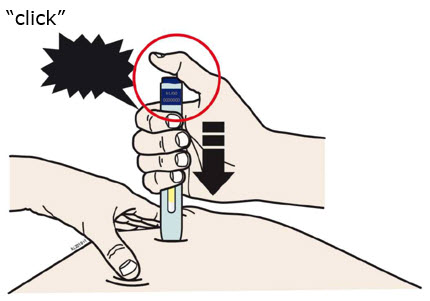
This text appears to describe a process for using an autoinjector to administer an injection. The user is instructed to hold the device against their skin, and upon hearing a "click" sound, wait 15 seconds for the injection to complete. A window on the device is said to turn yellow to indicate that the injection has finished. The text also suggests that the needle will be automatically covered and protected after the device is removed from the skin.*
FDA Label Image

Enbrel 179

FDA Label Image

3. Open The Wrapper That Contains The 27 Gauge Needle By Peeling Apart The Tabs And Set The Needle Aside For Later Use. (Enbrel 18)

FDA Label Image

Enbrel 180

FDA Label Image

Enbrel 181

* These product label images have been analyzed using experimental machine learning. Please verify findings with the primary label text.