Novolog Mix 70/30 Injection, Suspension
Product Images NDC 50090-4085

View Photos of Packaging, Regulatory Labels, and Product Appearance

Product Visual Gallery

This gallery contains 48 technical images submitted to the FDA as part of the official labeling for Novolog Mix 70/30 (NDC 50090-4085). Unlike standard consumer photos, these assets often include clinical data figures, molecular chemical structures, and official manufacturer packaging layouts.

As provided by A-s Medication Solutions, these visuals offer a comprehensive scientific overview of the product's physical and chemical identity, aiding pharmacists and researchers in product verification and study.

Product Images & Figures Index

FDA Label Image

Export 04

FDA Label Image

Export 05

FDA Label Image

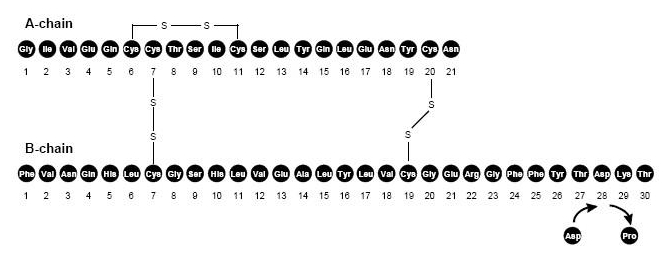
Molecular Chain Of Insulin Aspart. (Image 01)

FDA Label Image

Flexpen Components (Image 04)

Flexpen Components (Image 04)
NovaLog Mix 70/30 FlexPen is a type of insulin delivery device used by individuals with diabetes. It is designed to administer a specific ratio of insulin known as 70/30. The pen features a rubber grip for comfortable handling and can hold up to 12 glucose cartridges. The pen has a pointer dose system and a push-button mechanism for injecting the insulin. It also includes a ball arcetic seal extractor button for easy use. Unfortunately, the rest of the text is not readable.*
FDA Label Image

Needle Components. (Image 05)

FDA Label Image

Figure D: Screw Needle On. (Image 06)

FDA Label Image

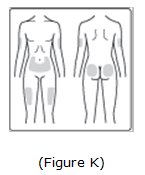
Image Of Possible Injection Sites. (Image 09)

FDA Label Image

Important (Image 10)

FDA Label Image

Important (Image 11)

FDA Label Image

Important (Image 12)

FDA Label Image

Important (Image 13)

FDA Label Image

Important (Image 14)

FDA Label Image

Important (Image 15)

FDA Label Image

Important (Image 16)

FDA Label Image

Important (Image 17)

FDA Label Image

Important (Image 18)

FDA Label Image

Important (Image 19)

FDA Label Image

Important (Image 20)

FDA Label Image

Important (Image 21)

FDA Label Image

Important (Image 22)

FDA Label Image

Important (Image 23)

FDA Label Image

Important (Image 24)

FDA Label Image

Figure E: Pull Off Outer Needle Cap. (Image 25)

FDA Label Image

Figure F: Pull Off Inner Needle Cap. (Image 26)

FDA Label Image

Vial Figure (Image 35)

FDA Label Image

Hand & Vial Figure (Image 36)

FDA Label Image

Figure A & Figure B (Image 37)

FDA Label Image

Figure C (Image 38)

FDA Label Image

Figure D (Image 39)

FDA Label Image

Figure E (Image 40)

FDA Label Image

Figure F (Image 41)

FDA Label Image

Figure G (Image 42)

FDA Label Image

Figure H (Image 43)

FDA Label Image

Figure I (Image 44)

FDA Label Image

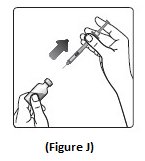
Figure J (Image 45)

FDA Label Image

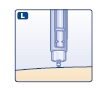
Figure L (Image 47)

FDA Label Image

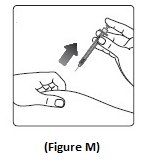
Figure M (Image 48)

FDA Label Image

Pull Off The Pen Cap. (Image 50)

FDA Label Image

Roll The Pen Between Your Palms. (Image 51)

FDA Label Image

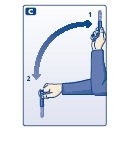
Move The Pen Up And Down. (Image 52)

FDA Label Image

Turn The Dose Selector To 2 Units. (Image 56)

FDA Label Image

Tap The Needle. (Image 57)

FDA Label Image

Press The Push-button. (Image 58)

FDA Label Image

Select Your Dose. (Image 59)

FDA Label Image

Press The Push Button To Inject. (Image 60)

FDA Label Image

Keep The Needle In The Skin For At Least 6 Seconds. (Image 61)

FDA Label Image

Replace The Pen Cap. (Image 62)

FDA Label Image

Label Image (Lbl500904085)

* These product label images have been analyzed using experimental machine learning. Please verify findings with the primary label text.