Enbrel
Product Images NDC 50090-4490

View Photos of Packaging, Regulatory Labels, and Product Appearance

Product Visual Gallery

This gallery contains 100 technical images submitted to the FDA as part of the official labeling for Enbrel (NDC 50090-4490). Unlike standard consumer photos, these assets often include clinical data figures, molecular chemical structures, and official manufacturer packaging layouts.

As provided by A-s Medication Solutions, these visuals offer a comprehensive scientific overview of the product's physical and chemical identity, aiding pharmacists and researchers in product verification and study.

Product Images & Figures Index

FDA Label Image

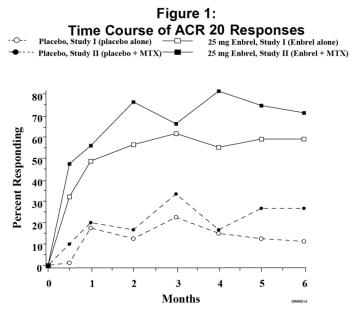
Figure 1 (Enbrel 02)
FDA Label Image

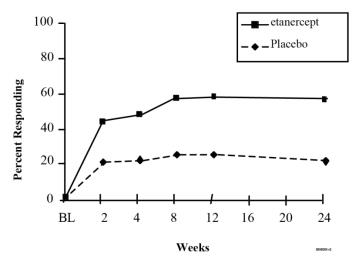
Figure 2. Asas 20 Responses In Ankylosing Spondylitis (Enbrel 03)

Figure 2. Asas 20 Responses In Ankylosing Spondylitis (Enbrel 03)
The text only contains a graph with percentage values, and some partially readable text. Therefore, a useful description cannot be generated.*
FDA Label Image

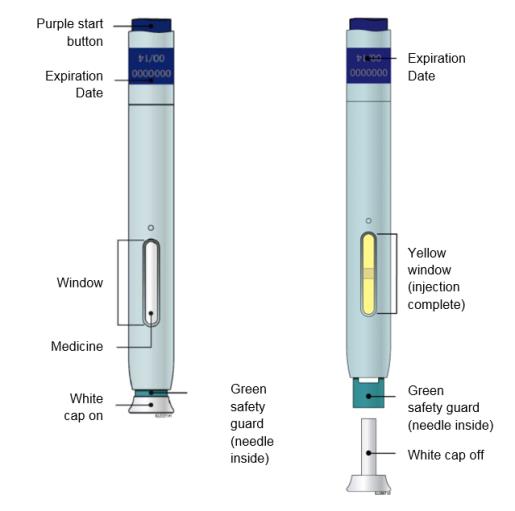
Guide To Part (Enbrel 05)

Guide To Part (Enbrel 05)
This is a description of a medical injection device with several features. The device has a purple start button and a white cap. There are two expiration dates and a yellow window to indicate when the injection is complete. Additionally, the device has a green safety guard to ensure safe handling during use.*
FDA Label Image

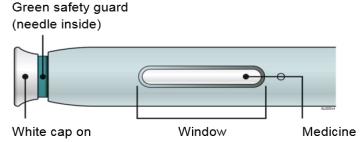
B Inspect The Enbrel Sureclick Autoinjector. (Enbrel 06)

FDA Label Image

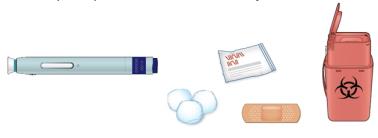
C Gather All Materials Needed For Your Injection. (Enbrel 07)

FDA Label Image

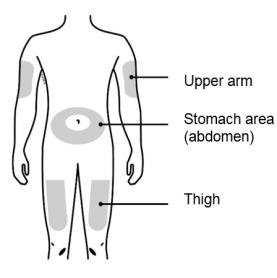
Clean Your Injection Site With An Alcohol Wipe. Let Your Skin Dry. (Enbrel 08)

Clean Your Injection Site With An Alcohol Wipe. Let Your Skin Dry. (Enbrel 08)
This appears to be a list of body parts: upper arm, stomach area (abdomen), and thigh.*
FDA Label Image

Step 2: Get Ready (Enbrel 09)

FDA Label Image

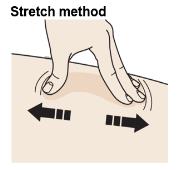
Stretch Method (Enbrel 0a)

FDA Label Image

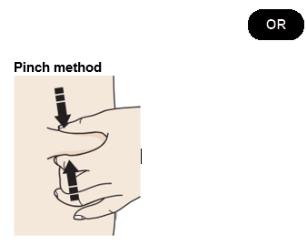
Pinch Method (Enbrel 0b)

FDA Label Image

Inject (Enbrel 0c)

Inject (Enbrel 0c)
This text is too short and ambiguous to generate a useful description. It appears to describe a green safety guard, possibly for a needle or similar device, but there is no further context or information available.*
FDA Label Image

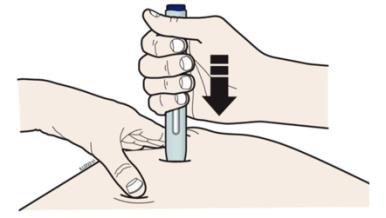
H Firmly Push The Autoinjector Down Onto Skin Until It Stops Moving. (Enbrel 0d)

FDA Label Image

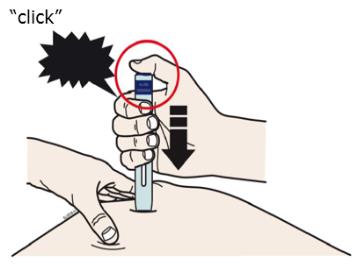
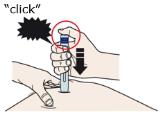
I When You Are Ready To Inject, Press The Purple Start Button. (Enbrel 0e)

FDA Label Image

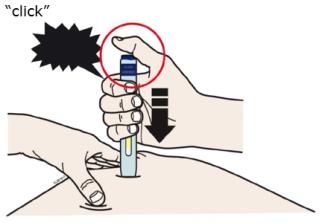
Click (Enbrel 0f)

FDA Label Image

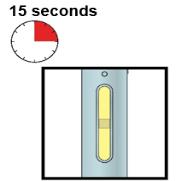
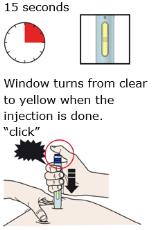
15 Seconds (Enbrel 10)

FDA Label Image

Note: After You Remove The Autoinjector From Your Skin, The Needle Will Be Automatically Covered. (Enbrel 11)

FDA Label Image

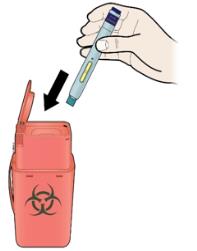
K Discard The Used Autoinjector And The White Cap. (Enbrel 12)

FDA Label Image

Read (Enbrel 13)

FDA Label Image

Guide To Parts (Enbrel 14)

FDA Label Image

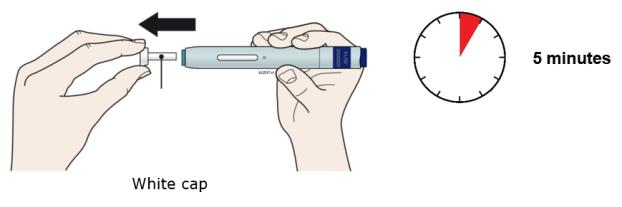
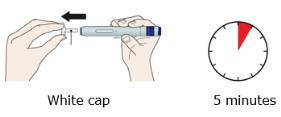
Step 2. Pull The White Cap Straight Off Only When You Are Ready To Inject. Do Not Leave The White Cap Off For More Than 5 Minutes. This Can Dry Out The Medicine. (Enbrel 15)

FDA Label Image

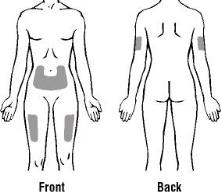
Step 1. Prepare And Clean Your Injection Site 1 (Enbrel 16)

Step 1. Prepare And Clean Your Injection Site 1 (Enbrel 16)
The text describes body parts: Upper arm, Stomach area or abdomen, and Thigh.*
FDA Label Image

Step 3. Stretch Or Pinch Your Injection Site To Create A Firm Surface. (Enbrel 17)

FDA Label Image

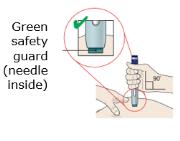
Step 4. Put The Green Safety Guard (needle Inside) On Your Skin At 90 Degrees. (Enbrel 18)

Step 4. Put The Green Safety Guard (needle Inside) On Your Skin At 90 Degrees. (Enbrel 18)
This text appears to be a list of keywords or phrases related to safety and possibly medical procedures. It includes the words "Green," "safety," "guard," and "needle inside." It is possible that these words are related to a particular product or industry, but without additional context it is difficult to determine how they are used.*
FDA Label Image

When You Are Ready To Inject, Press The Purple Start Button. You Will Hear A Click. (Enbrel 19)

FDA Label Image

Step 6. Keep Pushing Down On Skin For About 15 Seconds. (Enbrel 1a)

FDA Label Image

Fill Level Indicator (Enbrel 1b)

Fill Level Indicator (Enbrel 1b)
The text describes a Fill Level Indicator. It does not provide further information.*
FDA Label Image

Front Back (Enbrel 1c)

FDA Label Image

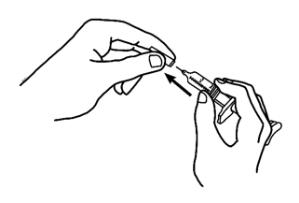
1. Pick Up The Prefilled Syringe From Your Flat Work Surface. Hold The Barrel Of The Prefilled Syringe With One Hand And Pull The Needle Cover Straight Off, Only When You Are Ready To Inject. Do Not Leave The Needle Cover Off For More Than Five Minutes. This Can Dry Out The Medicine.. (Enbrel 1d)

FDA Label Image

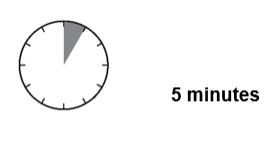
5 Minutes (Enbrel 1e)

FDA Label Image

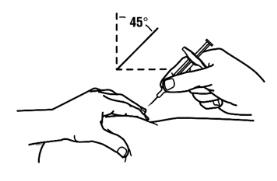
4. With A Quick And “dart Like” Motion, Insert The Needle At A 45 Degree Angle Into The Skin. (Enbrel 1f)

FDA Label Image

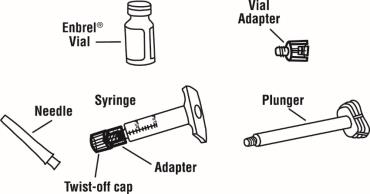
One Prefilled Diluent Syringe Containing 1 mL Of Diluent (liquid) With Attached Adapter And Twist Off Capone Plungerone Enbrel Vialone 27 Gauge ½ Inch Needle In Hard Plastic Coverone Vial Adapter (Enbrel 20)

FDA Label Image

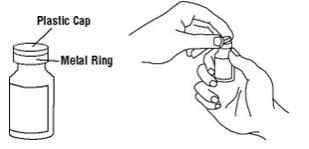
1. Remove The Pink Plastic Cap From The Enbrel Vial. Do Not Remove The Gray Stopper Or Silver Metal Ring Around The Top Of The Enbrel Vial. (Enbrel 21)

FDA Label Image

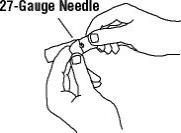
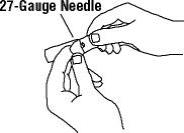
3. Open The Wrapper That Contains The 27 Gauge Needle By Peeling Apart The Tabs And Set The Needle Aside For Later Use. (Enbrel 22)

FDA Label Image

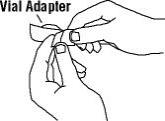
4. Open The Wrapper That Contains The Vial Adapter By Peeling Apart The Tabs And Set The Vial Adapter Aside For Later Use. Do Not Touch The Vial Adapter’s Twist On End Or The Spike Inside. (Enbrel 23)

FDA Label Image

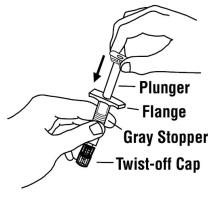
5. Slide The Plunger Into The Flange End Of The Syringe. (Enbrel 24)

5.	Slide The Plunger Into The Flange End Of The Syringe. (Enbrel 24)
The text describes a gray stopper that has a twist-off cap. It suggests that the stopper can be opened by twisting off the cap.*
FDA Label Image

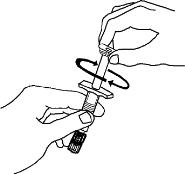
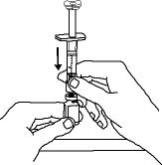
6. Attach The Plunger To The Gray Rubber Stopper In The Syringe By Turning The Plunger Clockwise Until You Feel A Slight Resistance. (Enbrel 25)

FDA Label Image

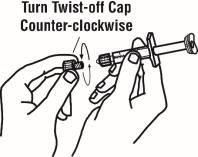
7. Remove The Twist Off Cap From The Prefilled Diluent Syringe By Turning Counter Clockwise. Do Not Bump Or Touch The Plunger. Doing So Could Cause The Liquid To Leak Out. You May See A Drop Of Liquid When Removing The Cap. This Is Normal. Place The Cap On Your Flat Work Surface. Do Not Touch The Syringe Tip. (Enbrel 26)

7.	Remove The Twist Off Cap From The Prefilled Diluent Syringe By Turning Counter Clockwise.  Do Not Bump Or Touch The Plunger.  Doing So Could Cause The Liquid To Leak Out.  You May See A Drop Of Liquid When Removing The Cap.  This Is Normal.  Place The Cap On Your Flat Work Surface.  Do Not Touch The Syringe Tip. (Enbrel 26)
The text appears to be an image rather than a recognizable text. Hence, the description is not available.*
FDA Label Image

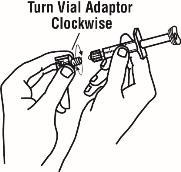
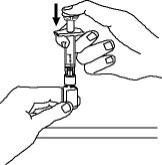
8. Once The Twist Off Cap Is Removed, Pick Up The Vial Adapter With Your Free Hand. Twist The Vial Adapter Onto The Syringe, Turning Clockwise Until You Feel A Slight Resistance. Do Not Over Tighten. (Enbrel 27)

FDA Label Image

9. Hold The Enbrel Vial Upright On Your Flat Work Surface. Grasp The Sides Of The Vial Adapter And Place It Over The Top Of The Enbrel Vial. Do Not Bump Or Touch The Plunger. Doing So Could Cause The Liquid To Leak Out. Insert The Vial Adapter Into The Gray Stopper On The Enbrel Vial. The Plastic Spike Inside The Vial Adapter Should Puncture The Gray Stopper. The Vial Adapter Should Fit Snugly. (Enbrel 28)

FDA Label Image

Hold The Enbrel Vial Upright On Your Flat Work Surface And Push The Plunger Down Until All The Liquid From The Syringe Is In The Enbrel Vial. You May See Foaming (bubbles) In The Vial. This Is Normal. (Enbrel 29)

FDA Label Image

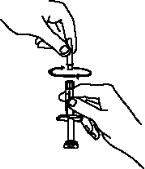
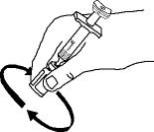
11. Gently Swirl The Enbrel Vial In A Circular Motion To Dissolve The Powder. If You Used The Dose Tray To Hold Your Enbrel Vial, Take The Vial (with The Vial Adapter And Syringe Still Attached) Out Of The Dose Tray, And Gently Swirl The Vial In A Circular Motion To Dissolve The Powder. (Enbrel 2a)

FDA Label Image

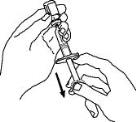
12. Turn The Enbrel Vial Upside Down. Hold The Syringe At Eye Level And Slowly Pull The Plunger Down To The Unit Markings On The Side Of The Syringe That Correspond With Your/your Child’s Dose. For Adult Patients, Remove The Entire Volume (1 mL), Unless Otherwise Instructed By Your Healthcare Provider. Be Careful Not To Pull The Plunger Completely Out Of The Syringe. Some White Foam May Remain In The Enbrel Vial. This Is Normal. (Enbrel 2b)

FDA Label Image

13. Check For Air Bubbles In The Syringe. Gently Tap The Syringe To Make Any Air Bubbles Rise To The Top Of The Syringe. Slowly Push The Plunger Up To Remove The Air Bubbles. If You Push Solution Back Into The Vial, Slowly Pull Back On The Plunger To Again Draw The Correct Amount Of Solution Back Into The Syringe. (Enbrel 2c)

FDA Label Image

14. Remove The Syringe From The Vial Adapter, By Holding The Vial Adapter With One Hand And Turning The Syringe Counter Clockwise With Your Other Hand. Do Not Touch Or Bump The Plunger. Place The Enbrel Vial With The Vial Adapter On Your Flat Work Surface. (Enbrel 2d)

FDA Label Image

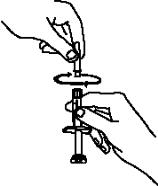
15. Continue To Hold The Barrel Of The Syringe. With Your Free Hand, Twist The 27 Gauge Needle Onto The Tip Of The Syringe Until It Fits Snugly. Do Not Remove The Needle Cover From The Syringe. Place The Syringe On Your Flat Work Surface Until You Are Ready To Inject Enbrel. (Enbrel 2e)

FDA Label Image

Remove The Pink Plastic Cap From The Enbrel Vial. Do Not Remove The Gray Stopper Or Silver Metal Ring Around The Top Of The Enbrel Vial. Write The Date You Mix The Powder And Solution On The Supplied “mixing Date:” Sticker And Attach It To The Enbrel Vial. (Enbrel 2f)

FDA Label Image

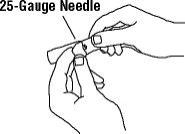
3. Open The Wrapper That Contains The 25 Gauge Needle By Peeling Apart The Tabs And Set The Needle Aside For Later Use. The 25 Gauge Needle Will Be Used To Mix The Liquid With The Powder And For Withdrawing Enbrel From The Vial. (Enbrel 30)

FDA Label Image

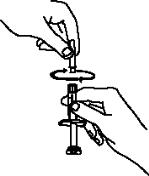
6. Remove The Twist Off Cap From The Prefilled Diluent Syringe By Turning Counter Clockwise. Do Not Touch Or Bump The Plunger. Doing So Could Cause The Liquid To Leak Out. You May See A Drop Of Liquid When Removing The Cap. This Is Normal. Place The Cap On Your Flat Work Surface. Do Not Touch The Syringe Tip. (Enbrel 31)

6.	Remove The Twist Off Cap From The Prefilled Diluent Syringe By Turning Counter Clockwise.  Do Not Touch Or Bump The Plunger.  Doing So Could Cause The Liquid To Leak Out.  You May See A Drop Of Liquid When Removing The Cap.  This Is Normal.  Place The Cap On Your Flat Work Surface.  Do Not Touch The Syringe Tip. (Enbrel 31)
This appears to be a set of instructions for opening a twist-off cap. The cap should be turned counter-clockwise to open it. The number "0" may refer to a starting position or may be unrelated.*
FDA Label Image

7. Continue To Hold The Barrel Of The Syringe. With Your Free Hand, Twist The 25 Gauge Needle Onto The Tip Of The Syringe Until It Fits Snugly. Place The Syringe On Your Flat Work Surface. (Enbrel 32)

FDA Label Image

8. Open The Wrapper That Contains The 27 Gauge Needle By Peeling Apart The Tabs And Set The Needle Aside For Later Use. The 27 Gauge Needle Will Be Used To Inject The Dose. (Enbrel 33)

FDA Label Image

9. Pick Up The Syringe From Your Flat Work Surface. Hold The Barrel Of The Syringe With One Hand, And Pull The Needle Cover Straight Off. To Avoid Damaging The Needle, Do Not Twist Or Bend The Needle Cover While You Are Removing It. Do Not Touch The Needle Or Allow It To Touch Any Surface. Do Not Touch Or Bump The Plunger. Doing So Could Cause The Liquid To Leak Out. (Enbrel 34)

FDA Label Image

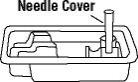
10. Place The Needle Cover (open Side Up) In The Round Space Marked “n” In The Enbrel Dose Tray. (Enbrel 35)

FDA Label Image

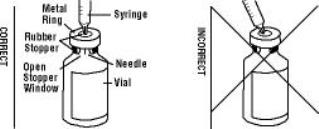
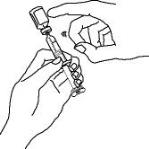
11. Place The Enbrel Vial On Your Flat Work Surface. Hold The Syringe With The Needle Facing Up, And Gently Pull Back On The Plunger To Pull A Small Amount Of Air Into The Syringe. Then, Insert The Needle Straight Down Through The Center Ring Of The Gray Stopper (see Illustrations). You Should Feel A Slight Resistance And Then A “pop” As The Needle Goes Through The Center Of The Stopper. Look For The Needle Tip Inside The Open Stopper Window. If The Needle Is Not Correctly Lined Up With The Center Of The Stopper, You Will Feel Constant Resistance As It Goes Through The Stopper And No “pop”. The Needle May Enter At An Angle And Bend, Break Or Prevent You From Adding Diluent Into The Enbrel Vial. (Enbrel 36)

FDA Label Image

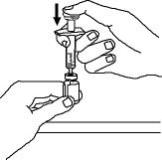
12. Push The Plunger Down Very Slowly Until All Liquid From The Syringe Is In The Enbrel Vial. Adding The Liquid Too Fast Will Cause Foaming (bubbles). (Enbrel 37)

FDA Label Image

13. Leave The Syringe In Place. Gently Swirl The Enbrel Vial In A Circular Motion To Dissolve The Powder. (Enbrel 38)

FDA Label Image

14. With The Needle In The Enbrel Vial, Turn The Vial Upside Down. Hold The Syringe At Eye Level And Slowly Pull The Plunger Down To The Unit Markings On The Side Of The Syringe That Correspond With The Correct Dose. Make Sure To Keep The Tip Of The Needle In The Solution. Some White Foam May Remain In The Enbrel Vial. This Is Normal. (Enbrel 39)

FDA Label Image

15. With The Needle Still Inserted In The Enbrel Vial, Check For Air Bubbles In The Syringe. Gently Tap The Syringe To Make Any Air Bubbles Rise To The Top Of The Syringe. Slowly Push The Plunger Up To Remove The Air Bubbles. If You Push Solution Back Into The Vial, Slowly Pull Back On The Plunger To Draw The Correct Amount Of Solution Back Into The Syringe. (Enbrel 3a)

FDA Label Image

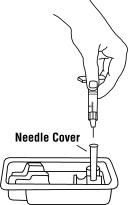
16. Remove The Syringe And Needle From The Enbrel Vial. Keep The Needle Attached To The Syringe And Insert The 25 Gauge Needle Straight Down Into The Needle Cover In The Enbrel Dose Tray. (Enbrel 3b)

FDA Label Image

17. Twist The 27 Gauge Needle Onto The Syringe Until It Fits Snugly. Do Not Remove The Needle Cover From The Syringe. Place The Syringe On Your Flat Work Surface Until You Are Ready To Inject Enbrel. (Enbrel 3c)

FDA Label Image

Step 4: Choosing And Preparing An Injection Site (Enbrel 3d)

FDA Label Image

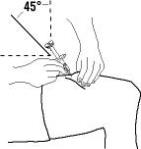
2. With One Hand, Gently Pinch The Cleaned Area Of Skin And Hold It Firmly. With The Other Hand, Hold The Syringe (like A Pencil) At A 45 Degree Angle To The Skin. (Enbrel 3e)

FDA Label Image

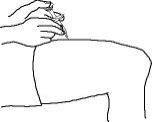
4. When The Needle Is Completely Inserted Into The Skin, Let Go Of The Skin That You Are Holding. With Your Free Hand, Hold The Syringe Near Its Base To Stabilize It. Then Push The Plunger To Inject All Of The Enbrel Solution At A Slow, Steady Rate. (Enbrel 3f)

FDA Label Image

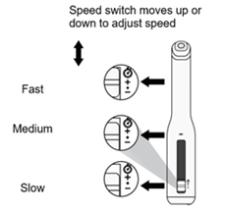
Speed Switch Moves Up Or Down To Adjust Speed (Enbrel 40)

FDA Label Image

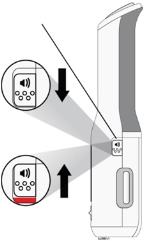
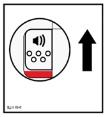
Autotouch Makes Sounds (♪) To Help Guide Yourinjection. When You Receive A New Autotouch, Itwill Be Set With The Sounds On (sound Switch Down). (Enbrel 41)

FDA Label Image

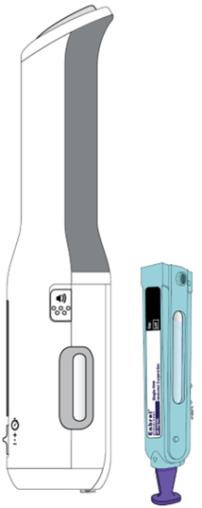
Autotouch Reusable Autoinjector (Enbrel 42)

Autotouch Reusable Autoinjector (Enbrel 42)
This appears to be a list of components or features of a device or equipment. It includes a finger grip, a door button, a viewing window, a speaker, error symbols, a progress bar, a speed switch and an injection end.*
FDA Label Image

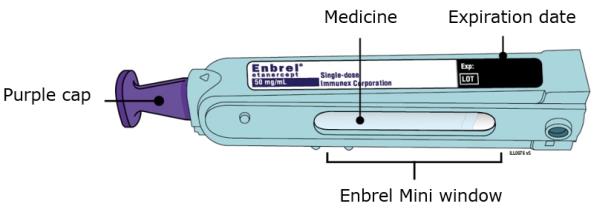
Enbrel Mini Single-dose Cartridge (Enbrel 43)

Enbrel Mini Single-dose Cartridge (Enbrel 43)
This is a description of Enbrel Mini® single-dose cartridge, a medicine package that includes a purple cap for before and after use. The medication can be viewed through a window on the package, and there is an expiration date labeled on the side.*
FDA Label Image

B Inspect The Enbrel Mini Single-dose Prefilled Cartridge. (Enbrel 44)

FDA Label Image

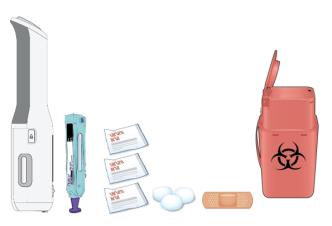
Gather All Materials You Need For Your Injection (Enbrel 45)

FDA Label Image

Also Clean The Injection End Of The Autotouch® With A New Alcohol Wipe. (Enbrel 46)

FDA Label Image

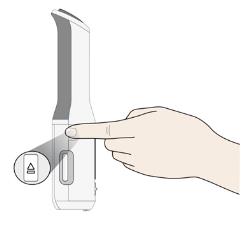
Press The Door Button To Open The Door. (Enbrel 47)

FDA Label Image

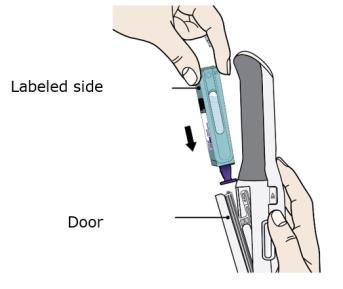
Hold The Enbrel Mini® Single-dose Cartridge With The Labeled Side Facing Out And Slide Into Door. (Enbrel 48)

FDA Label Image

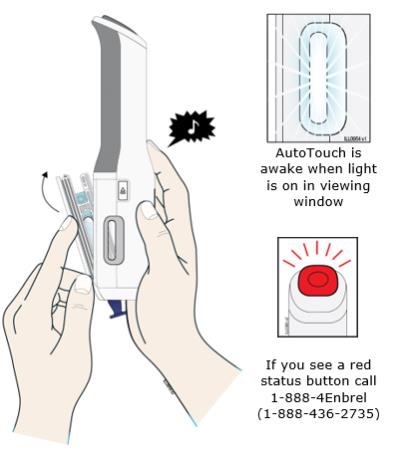
Close The Door. (Enbrel 49)

Close The Door. (Enbrel 49)
AutoTouch is a feature that becomes active when the light is on in the viewing window. If a red status button is visible, it suggests that you call 1-888-4Enbrel at 1-888-436-2735.*
FDA Label Image

Sound On (Enbrel 4a)

FDA Label Image

Sound Off (Enbrel 4b)

FDA Label Image

Stop (Enbrel 4c)

FDA Label Image

• Before Placing Autotouch On Your Skin, Make Sure Thatautotouch Is “awake.” Look To See That The Viewingwindow Light Is On. If The Viewing Light Is Off This Meansit Is In “sleep Mode,” Press The Status Button To “wake Itup.” (Enbrel 4d)

FDA Label Image

When You Are Ready To Inject, Pull The Purple Cap Straight Down And Off. Do Not Leave The Purplecap Off For More Than 5 Minutes. This Can Dry Out The Medicine. (Enbrel 4e)

FDA Label Image

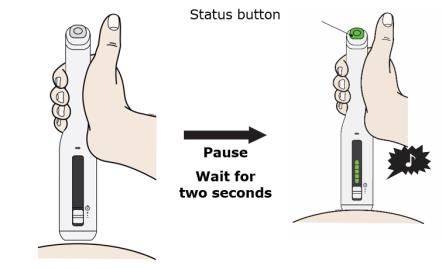
Place And Hold On The Skin. Wait For The Status Button To Turn Green And A Chime To Sound. (Enbrel 4f)

Place And Hold On The Skin. Wait For The Status Button To Turn Green And A Chime To Sound. (Enbrel 4f)
This text appears to be instructions for using a button or feature called "Status". One option available for this button is "Pause". Additionally, the text instructs the user to "Wait for two seconds". This could be related to the use of the Status button or be separate instructions altogether.*
FDA Label Image

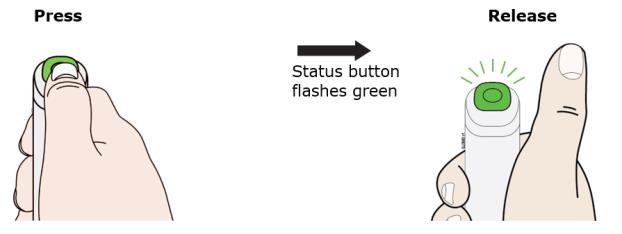
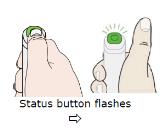
Press And Release The Status Button. The Status Button Will Start To Flash Green. You Will Hear A Click When The Injection Starts. (Enbrel 50)

FDA Label Image

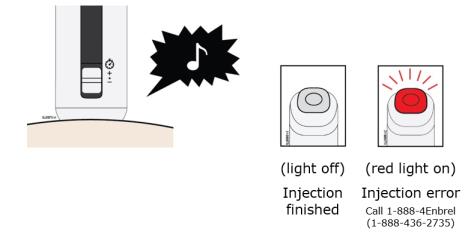
The Injection Is Finished When The Green Light Turns Off And A “chime” Sounds. Check To Make Sure You Do Not See A Red Status Button. (Enbrel 51)

The Injection Is Finished When The Green Light Turns Off And A “chime” Sounds. Check To Make Sure You Do Not See A Red Status Button. (Enbrel 51)
The text suggests that there is an error with injection and gives a phone number (1-888-436-2735) to call for help or assistance. However, it is not clear what kind of injection or context of the error. Additionally, the mention of a light being off and a red light being on suggests some kind of equipment is involved.*
FDA Label Image

When Your Injection Is Finished, You Will Hear A Motor Noise For A Few Seconds. When Finished, The Door Will Automatically Open. Do Not Block The Door With Your Hand. (Enbrel 52)

FDA Label Image

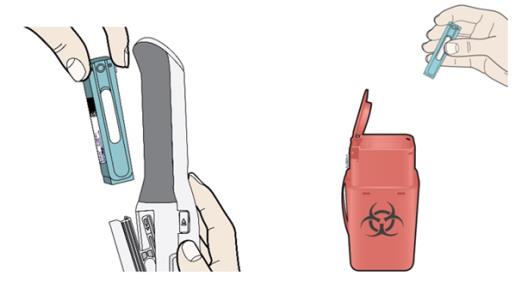
Remove And Throw Away (dispose Of) The Enbrel Mini® Single-dose Prefilled Cartridge. (Enbrel 53)

FDA Label Image

Troubleshooting: Error Symbols (Enbrel 54)

Troubleshooting: Error Symbols (Enbrel 54)
The text appears to be about troubleshooting error symbols for the AutoTouch reusable autoinjector used for Enbrel injections. It describes various error messages that may appear, such as low battery, dead battery, Enbrel Mini problems, too hot or too cold temperature, needle exposure, and AutoTouch failure, providing instructions on how to handle each situation.*
FDA Label Image

User Manual (Enbrel 56)

FDA Label Image

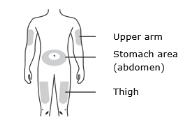
Prepare And Clean Your Injection Site. (Enbrel 57)

Prepare And Clean Your Injection Site. (Enbrel 57)
The text is a list of body parts: Upper arm, Stomach area, and Abdomen. The last word appears to have a typo as "sbdomen" instead of "abdomen." The letters "igh" are also present, but it is not clear whether they are meant to be part of a word or simply a random pattern.*
FDA Label Image

Labeled Side (Enbrel 58)

FDA Label Image

Place And Hold On Skin. Wait For The Status Button To Turn Green. (Enbrel 59)

FDA Label Image

To Start Injection:press And Release The Green Status Button. (Enbrel 5a)

FDA Label Image

Injection Is Finished When You Hear A Chime And All Lights Are Turned Off. (Enbrel 5b)

FDA Label Image

Autotouch™ Reusable Autoinjector (Enbrel 5c)

Autotouch™ Reusable Autoinjector (Enbrel 5c)
This is a description of the physical components/features of a door. It includes a finger grip, door button, viewing window, and a door itself. No context or specific details are given as to what type of door this pertains to.*
FDA Label Image

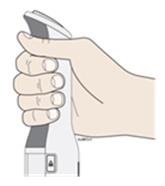
Finger Gripwhen Injecting, Hold The Autotouch™ Reusable Autoinjector With Fingers Wrapped Around The Gray Finger Grip. (Enbrel 5d)

FDA Label Image

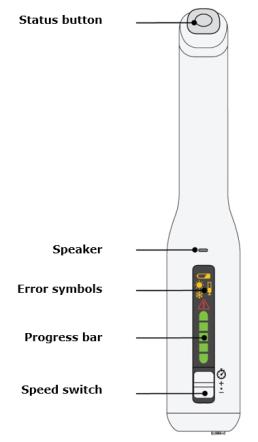
Autotouch™ Reusable Autoinjector (Enbrel 5e)

Autotouch™ Reusable Autoinjector (Enbrel 5e)
The text appears to be describing a device or software with various features, including a speaker, error symbols, progress bar, and speed switch. However, without additional context or information it is difficult to provide a more specific or detailed description.*
FDA Label Image

Autotouch™ Reusable Autoinjector (Enbrel 5f)

FDA Label Image

Before Use (Enbrel 60)

Before Use (Enbrel 60)
This is a set of instructions for the medication "Enbrel Mini," which includes directions to check the label and expiration date before use, as well as a reference to a purple cap on the medicine.*
FDA Label Image

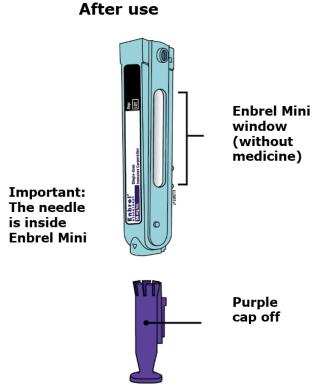
After Use (Enbrel 61)

After Use (Enbrel 61)
Enbrel Mini is a medication container that probably contains a needle and medicine. The cap of the container is purple. The text mentions the importance of the needle which is located inside the container. The text also refers to a "window" but it's unclear what that means.*
FDA Label Image

Autotouch® Reusable Autoinjector (Enbrel 62)

Autotouch® Reusable Autoinjector (Enbrel 62)
This text provides a brief description of two different items: a plunger rod and a single-dose prefilled cartridge for the Enbrel Mini®. It appears to be a fragment of information rather than a full description.*
FDA Label Image

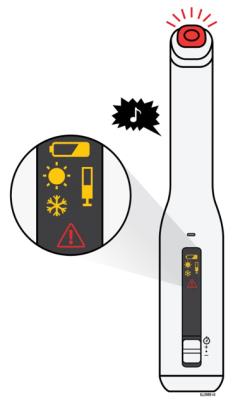
The Autotouch™ Reusable Autoinjector Makes A Chime Sound, Lights The Status Button Red, And Displays An Error Symbol If There Is A Problem.see The Following Description Of Each Error Symbol, Possible Reasons For The Error, And Actions You Can Take. (Enbrel 63)

FDA Label Image

Low Battery (Enbrel 64)

FDA Label Image

Battery Dead (Enbrel 65)

FDA Label Image

Too Hot Or Cold (Enbrel 66)

FDA Label Image

Enbrel Mini Problem (Enbrel 67)

* These product label images have been analyzed using experimental machine learning. Please verify findings with the primary label text.