All insulin products can elicit the formation of insulin
antibodies. The presence of such insulin antibodies may increase or decrease the
efficacy of insulin and may require adjustment of the insulin dose. In phase 3
clinical trials of LANTUS, increases in titers of antibodies to insulin were
observed in NPH insulin and insulin glargine treatment groups with similar
incidences.
You will find further useful information on the back side of this leaflet in
the chapters:
(A.) General Notes(B.) Troubleshooting(C.) Storage Instructions(D.) Other Information- Alcohol swabs
- BD Ultra-Fine needles
- 3 mL Lantus or Apidra Cartridge System, at room temperature
If you have any questions about OptiClik® or about diabetes, ask your healthcare professional, go to
www.opticlik.com or call sanofi-aventis at 1-800-633-1610.
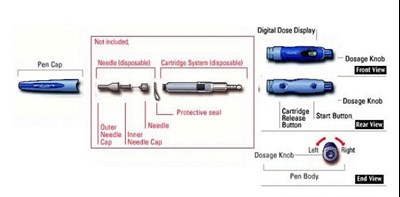
Image Of Opticlik (Opticlik)
General Warnings and Precautions
This pen is only for your use. Do not share it with anyone else.
Insulin
Check the label on your Cartridge System to make sure you have the correct
insulin before injecting. Using the wrong insulin may result in unwanted changes
in blood sugar that could be harmful to your health.
Needles
You must use a new sterile needle (intact protective seal) for each
injection. This prevents a blocked needle and air bubbles. In order to avoid
injuries, replace Outer Needle Cap before removing and disposing of used
needles.
Safety test
Before each injection, carry out the Safety Test (Step 3). If you do not follow the instructions completely, you may get too much or too
little insulin. Injecting too much or too little insulin dose may lead to
unwanted blood sugar changes (see the package leaflet for your insulin). Do not
perform the safety test without the needle attached.
Damage to OptiClik®
OptiClik® may become damaged by rough handling,
dropping, or turning of the Dosage Knob by force. Make sure that no dirt gets in
contact with the mechanical parts. You should always make sure that:
a)The Cartridge System is undamaged.b)The Start Button, Dosage Knob, and Digital Dose Display operate
properly.Do not use tools on OptiClik®. If you
are not sure whether or not your OptiClik® is damaged,
contact your healthcare professional or call 1-800-633-1610. If damaged, it is
no longer safe to use. In an emergency, you can draw up the insulin from the
Cartridge System using a U-100 insulin
syringe.
OptiClik® should not be used near electrical and
electronic equipment.
Step 1: Inserting the Cartridge System
Do not shake the Cartridge System before use. You should look at the solution
in the Cartridge System before inserting it into OptiClik®. If the solution is cloudy, slightly colored, or has
particles in it, do not use the Cartridge System.
AMake sure the Dosage Knob is pushed in.
BHold the Pen Body with the release button facing up. Insert the Cartridge
System straight into the Pen Body. If you meet resistance, slightly raise and
rotate the Cartridge System while inserting it. Make sure that it clicks in. Do
not use force.CTo make sure that the Cartridge System clicked in place properly, gently try
pulling out the Cartridge System. The Cartridge System should not come out. Make
sure you do not press the Cartridge Release button during or after this
check.OptiClik® is now ready for Step 2 (Attaching the
needle), or it can be stored with the attached Pen
Cap.
DO NOT STORE YOUR OPTICLIK® IN A
REFRIGERATOR AFTER CARTRIDGE SYSTEM IS INSERTED IN OPTICLIK®
Step 2: Attaching the needle
APeel off the Protective Seal on the needle.
BUse an alcohol swab to wipe the rubber seal on the end of the Cartridge
System. Attach a new needle straight to the Cartridge System and screw into
place without removing the Outer and Inner Needle CapsCRemove Outer Needle Cap from the needle.
Save Outer Needle Cap for use
later on in discarding the needle.Step 3: Safety Test
Before each injection, carry out the Safety Test or you may get too much or
too little insulin.
Make sure a needle is attached to OptiClik® before you do the Safety Test. Do not press the
Cartridge Release Button during these steps.
APress the Start Button.BThe Dosage Knob must come out. "00" appears in the Digital Dose
Display.CTurn the Dosage Knob to the right (clockwise) until it clicks. "01" appears
in the Digital Dose Display.DRemove and discard the Inner Needle Cap. Handle the exposed needle
carefully.EHold OptiClik® with the needle pointing up.Press the Dosage Knob fully until it stays in.
Insulin must appear at the tip of the needle. If not, repeat the Safety Test.
When replacing an empty cartridge system with a new one, it might require
repeating this procedure several times.
A Safety Test must be carried out before each
injection.
Additional information about "Cartridge System" and "Removing air bubbles" is
on the back side of this leaflet.
Step 4: Setting the dose
APress the Start Button.BTurn the Dosage Knob slowly to the right (clockwise) until you reach your
required dose. Make sure that the dosage knob is not in between two dose steps.
You must feel and hear a click. If you have selected a dose that is too high,
simply turn the Dosage Knob back (to the left). If you have dialed past 80
units, see (B.) TROUBLESHOOTING, Dose-setting on the back of this
leaflet.Step 5: Injecting the dose
ACheck the label on your cartridge system to make sure you have the correct
insulin before injecting. Clean the injection area with alcohol. Insert the
needle as recommended by your healthcare professional (e.g., lightly pinch a
fold of skin on your upper arm, stomach, or thigh. Insert the needle straight
into the pinched skin).BPress the Dosage Knob slowly and completely. Slowly count to 10 while
holding the Dosage Knob in before withdrawing the needle.The Dosage Knob must
stay in. The Dosage Knob staying in after injection indicates the delivery of
the full dose.
After injecting your dose, the Digital Dose Display will not
go back to "0" but will show the delivered dose for 2 minutes. Do not re-inject
your dose as this may result in an overdose.Do not press the Cartridge Release Button or the Start Button while
injecting.
Step 6: Removing the needle
AReplace Outer Needle Cap carefully.BRemove the needle after the injection. For safe disposal of needles see (A.)
GENERAL NOTES, Needles for OptiClik® on the back of this
leaflet. Always replace Pen Cap on the Pen Body after use.OptiClik® can be stored with the attached Cartridge
System until your next injection. See (C.) STORAGE INSTRUCTIONS.
Step 7: Replacing an empty Cartridge System
AMake sure the Dosage Knob is pushed in.BPress the Cartridge Release Button, and remove the entire Cartridge System.
Dispose of the Cartridge System.Start again at Step 1 (Inserting the Cartridge System).
A. GENERAL NOTES
Cartridge System
The Cartridge System is sold separately. Before every injection, check the
appearance of the solution in the Cartridge System and follow the instructions
in the "Patient Information" leaflet for the insulin. It is important to follow
the directions of this Instruction Leaflet closely to help avoid side effects
(e.g., infections, improper dosing). Consult with your healthcare professional
before using OptiClik®.
Before the use of an unopened, refrigerated Cartridge System, take it out of
the refrigerator and leave it at room temperature for about 1 to 2 hours. Do not
remove the Cartridge System from packaging until ready to use. This will prevent
dust or dirt from getting into the mechanical parts of the Cartridge System. Use
an alcohol swab to wipe the rubber seal on the end of the Cartridge System
before inserting the needle. Do not open or manipulate the Cartridge System in
any way.
Needles for OptiClik®
BD Ultra-Fine needles are available from BD Consumer Healthcare. Contact your
healthcare professional for further information.
Needles may vary from country to country and may not be interchangeable. If
you intend to travel abroad, make sure that you have sufficient needles and
insulin with you.
Never store OptiClik® with a needle
attached. Storing OptiClik® with the needle
attached may allow insulin to leak from OptiClik® and air
bubbles to form in the Cartridge System. Used needles should be placed in sharps
containers (such as red biohazard containers), hard plastic containers (such as
detergent bottles), or metal containers (such as an empty coffee can). Such
containers should be sealed and disposed of properly.
Removing air bubbles
Air bubbles must be removed before each injection during the Safety Test
(Step 3 for Safety Test). If air bubbles still remain, repeat the Safety Test,
turning the Dosage Knob to the right until "02" appears on the display. Gently
tap the Cartridge System until the air rises to the top of the Cartridge System
tip. Then press the Dosage Knob until it stays in. If
necessary, keep repeating the Safety Test until insulin appears at the tip of
the needle.
Setting the dose and Display feature
To read the dose correctly, hold OptiClik® as shown in
Step 4B, Setting the dose. The printed "OptiClik" must be readable left of the
dose display. Do not hold the pen upside down when reading the dose display;
otherwise you may misread the dose on the Digital Dose Display.
The Digital
Dose Display shows the delivered dose for 2 minutes after every injection and
then turns off to conserve battery power. With the Dosage Knob released the
display also switches off after 2 minutes.
How long will OptiClik® last
The expected lifetime of OptiClik® is 3 years.
flashes when the Start Button is pressed:
OptiClik® is reaching the end of its expected lifetime
(3 years). The Digital Dose Display will continue to operate for about 4 more
weeks. Please obtain a new OptiClik®.
stays when the Start Button is pressed:
OptiClik® has reached the end of its lifetime. When you
continue to turn the Dosage Knob, the display still . Please obtain a new OptiClik®.
B. TROUBLESHOOTING
Safety test
No insulin appears at the needle tip during Step 3
(Safety Test):
Repeat Step 3 (Safety Test). If no insulin appears this time either, confirm
that:
- The needle is firmly in position. Replace a
blocked or defective needle with a new one.
- The Dosage Knob has been set correctly (always
turn the Dosage Knob to the right/clockwise to preselect the dose).
Turn the
Dosage Knob one click to the right, equal to one unit. - The Cartridge System has been inserted
correctly. Check by trying to pull the Cartridge System gently out. If the
Cartridge System comes out, reinsert it completely, see Step 1 (Inserting the
Cartridge System). Repeat Step 3 (Safety Test).
- The Cartridge System is not empty. If it is empty, insert a new one. Repeat
Step 3 (Safety Test).
You hear no clicking sound during dose-setting:
The Cartridge System may have been inserted incorrectly. Check by trying to
pull the Cartridge System gently out. If the Cartridge System comes out,
reinsert it completely, see Step 1 (Inserting the Cartridge System). Repeat Step
3 (Safety Test).
If you still hear no clicking sound, try a new Cartridge System and listen
for clicking sound. If there is still no clicking sound, obtain a new
OptiClik®.
Dose-setting
Insulin drips from the needle tip during
dose-setting:
The maximum dose of OptiClik® is 80 units. If you
continue to dial after reaching 80 units, insulin will drip from the needle and
the display will continue to show "80". In such a case, DO NOT turn back to the
required dose, instead dial back (to the left) to "00". Press the Dosage Knob to
expel excess insulin and to reset OptiClik®.
OptiClik® is now again ready for dose setting. If you
need a dose greater than 80 units, you should give it as more than one
injection.
You feel resistance during dose-setting and the Dosage Knob
will not turn further forward (to the right):
a)You are turning to the left and trying to dial down below zero. Turn the
Dosage Knob to the right to dial your dose.b)The Cartridge System is almost empty and no longer contains a sufficient
amount of insulin for the dose you need. For example, if there are only 20 units
left in the Cartridge System and you need 25 units, the dosage knob will stop at
20 units. You can choose to do one of the following:
1)Do not force the Dosage Knob any further (to the right). Inject the partial
dose (20 units in the example), and replace the empty Cartridge System with a
new one. Perform the Safety Test as described in Step 3, then inject the
remainder of the dose to equal your total prescribed dose. In the above example,
the remaining dose is 5 units.
OR2)Dial back (to the left) to "00". Follow Step 7 (Replacing an empty Cartridge
System), Step 1 (Inserting the Cartridge System), Step 2 (Attaching the needle),
and Step 3 (Safety Test).c)You have dialed (to the right) past the maximum dose of 80 units and have no
needle (or a clogged needle) mounted. Dial completely back (to the left) to
"00", and perform Step 2 (Attaching the needle) and Step 3 (Safety Test). Do not
force the Dosage Knob to turn further.The Dosage Knob does not stop at "00":
When turned back completely, the Dosage Knob should stop at "00", however,
sometimes it may stop at "02" or "01". Make sure that a needle is attached; then
press the Dosage Knob down (insulin will appear at the tip of the needle).
OptiClik® is now ready for dose setting.
The Dosage Knob no longer turns after a new Cartridge System
has been inserted:
Check that the Cartridge System is firmly clicked in. Reseat the Cartridge
System and try again. If it still does not work, try again with a new Cartridge
System, see Step 1 (Inserting the Cartridge System). Otherwise, get a new
OptiClik®.
The Dosage Knob does not come out after you pressed the
Start Button:
Do not pull out the Dosage Knob. Check that the Cartridge System is firmly
clicked in, see Step 1B-Inserting the Cartridge System.
Insulin injection
The Dosage Knob cannot be pressed down for the insulin
injection or it does not stay down:
- In setting the dose, you have turned the Dosage Knob so that it is between
two dose steps.
Turn the Dosage Knob to the right or the left to the desired
dose. - The needle may be blocked or defective. Use a new needle.
- Avoid pushing the Start Button and Dosage Knob at the same time.
After withdrawing the needle from your skin, more than one
drop of insulin drips from the needle:
It is possible that you may not have injected your full insulin dose. DO NOT
try to make up for the shortfall in your insulin dose by giving a second
injection (otherwise you will be at risk for low blood sugar).
Please check your blood sugar and consult with your healthcare
professional.
You can avoid the problem next time by taking the following steps:
- Remove any air bubbles that may be present in the Cartridge System
(see
"GENERAL NOTES: Removing air bubbles"). - After delivering the insulin dose, slowly count to 10 before withdrawing the
needle from your skin.
Cartridge System replacement
The Cartridge System and Pen Body do not click back together
properly:
- Check that the Dosage Knob is pushed in.
- Check that you have put the Cartridge System correctly into the Pen Body.
Take the Cartridge System out and insert it again (see under Step 7 for
replacing an empty Cartridge System and Step 1 for inserting the Cartridge
System). Repeat Step 2 for attaching the needle and Step 3 for Safety
Test.
Digital Dose Display functions
is displayed:
The Dosage Knob has been forced into the negative range with excessive force.
The Cartridge System might be damaged and needs to be replaced. Follow the
instructions under Step 7 to replace the Cartridge System and dispose of the
damaged Cartridge System. Repeat Step 1 for inserting the Cartridge System, Step
2 for attaching the needle, and Step 3 for Safety Test.
and flash alternately:
a)The Dosage Knob has been forced into the negative range and was pushed in.
The Cartridge System might be damaged and needs to be replaced. Repeat Step 7
for replacing an empty Cartridge System and dispose of the damaged Cartridge
System. Repeat Step 1 for inserting the Cartridge System, Step 2 for attaching
the needle, and Step 3 for Safety Test.b)The Dosage Knob has been turned too quickly. You can choose to do one of the
following:
1)Dispose of the unknown pre-set dose by pressing the Dosage Knob. Set your
dose (Step 4) and inject your dose (Step 5). OR 2)Turn the Dosage Knob slowly backward (to the left) until it stops, and then
push the Dosage Knob in. Restart OptiClik® and dial your
dose.No numbers appear on the Digital Dose Display when the Start
Button is pressed or when the Dosage Knob is released:
Press the Dosage Knob. Start with a Safety Test (Step 3).
If there are still no numbers on Digital Dose Display, you should obtain a
new OptiClik®.
The Digital Dose Display goes blank during dose setting
(e.g., if you are interrupted in the middle of your injection
preparations):
The energy save function has automatically come into operation. Turn the
Dosage Knob one click further (to the right). OptiClik®
should now be ready to use again; check the Digital Dose Display and adjust for
the right dose if needed.
Battery Information
flashes when the Start Button is pressed:
Your battery is running out. Please obtain a new OptiClik® as soon as possible.
is displayed when the Start Button is pressed:
Your battery has run out. Please obtain a new OptiClik®.
C. STORAGE INSTRUCTIONS
Always store OptiClik® Pen Body at
room temperature below 86°F (30°C). Do not store OptiClik®, (with or without the Cartridge System inserted), in a
refrigerator at any time. Protect OptiClik® from
moisture and direct heat. When OptiClik® is not in use,
push the Dosage Knob in to conserve the battery and to ensure OptiClik® functions throughout its expected lifetime.
To avoid dust or dirt from getting into OptiClik®,
always replace the Pen Cap.
Once the Cartridge System is used with OptiClik®, the
Cartridge System can be used for up to 28 days under normal carrying conditions
(for Lantus®, below 86°F [30°C]; for Apidra®, below 77°F [25°C]). For specific insulin storage
information, see "Patient Information" for Lantus® or
Apidra® 3 mL Cartridge System.
Do not store OptiClik® with the needle attached to the
Cartridge System.
D. OTHER INFORMATION
Care, cleaning, and maintenance instructions
Handle OptiClik® carefully. To keep it clean, use a
clean damp cloth. Clean it once a week. Dirt can impede the operation. DO NOT
use cleaning agents. Use an alcohol swab only for cleaning the Cartridge
System's rubber seal.
Lifetime
OptiClik® has a lifetime of 3 years. See "(A.) GENERAL
NOTES, How long will OptiClik® last" for details.
Manufactured for and distributed by:
sanofi-aventis U.S. LLC
Bridgewater NJ 08807
OptiClik®, Lantus® and
Apidra® are registered trademarks of sanofi-aventis U.S.
LLC
For more information call toll free 1-800-633-1610 or visit
www.opticlik.com
Date of revision:
December 2006




