Enbrel Solution
Product Images NDC 58406-032

View Photos of Packaging, Regulatory Labels, and Product Appearance

Product Visual Gallery

This gallery contains 100 technical images submitted to the FDA as part of the official labeling for Enbrel (NDC 58406-032). Unlike standard consumer photos, these assets often include clinical data figures, molecular chemical structures, and official manufacturer packaging layouts.

As provided by Immunex Corporation, these visuals offer a comprehensive scientific overview of the product's physical and chemical identity, aiding pharmacists and researchers in product verification and study.

Product Images & Figures Index

FDA Label Image

Enbrel 01

Enbrel 01
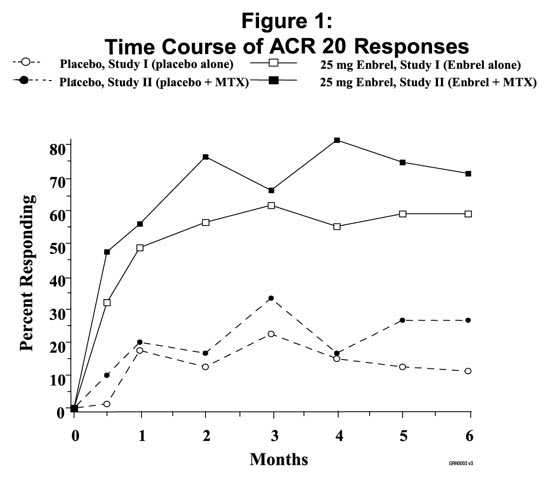
The figure shows the time course of ACR20 responses in two studies. Study I compares the response to a placebo alone versus a 25 mg Enbrel dose alone. Study II compares the response to a placebo plus MTX versus a 25 mg Enbrel dose plus MTX. The percent responding is also shown.*
FDA Label Image

Figure 1 (Enbrel 02)

Figure 1 (Enbrel 02)
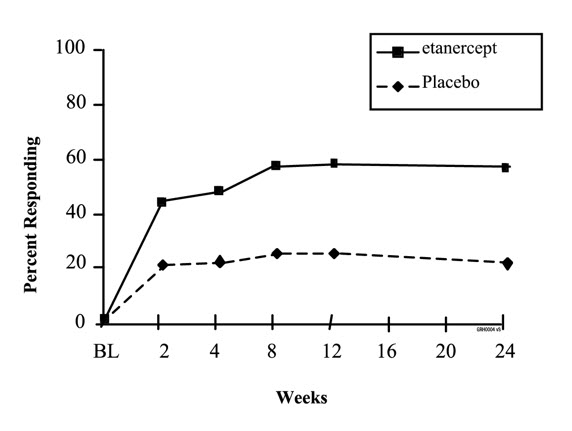
This is a chart or table showing the percentage of respondents for a treatment (most likely with a drug called etanercept) and a placebo. The percentage for the treatment group is 100, but further details are not available due to the limited nature of the text obtained via .*
FDA Label Image

Figure 2. Asas 20 Responses In Ankylosing Spondylitis (Enbrel 03)

FDA Label Image

Enbrel 04

FDA Label Image

Guide To Parts (Enbrel 05)

Guide To Parts (Enbrel 05)
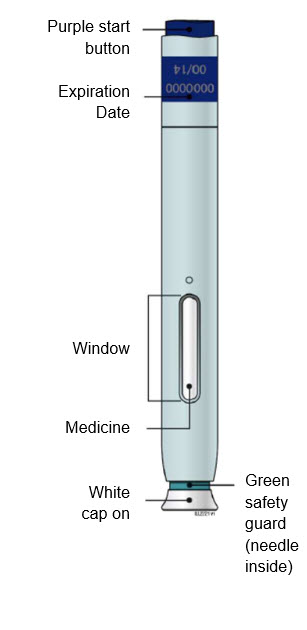
The text appears to describe a medicine container or device with a purple start button, an expiration date, and a safety guard (with a needle inside). However, without additional context or information, it is difficult to determine the specific purpose or use of this item.*
FDA Label Image

B Inspect The Enbrel Sureclick Autoinjector. (Enbrel 06)

B  Inspect The Enbrel Sureclick Autoinjector. (Enbrel 06)
This appears to be a set of instructions regarding the use of a medical injection. The expiration date is mentioned, as well as a yellow window that indicates the injection has been completed. A green safety guard is also mentioned, which suggests that the needle is inside and protected. Finally, it is mentioned that the white cap should be removed.*
FDA Label Image

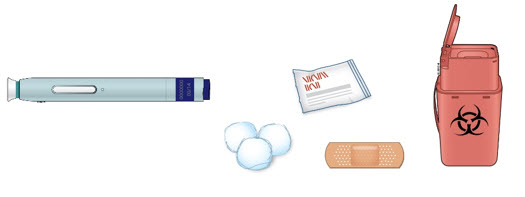
New Autoinjector Alcohol Wipes Cotton Ball Or Gauze Pad Adhesive Bandage Sharps Disposal Container. “step 4: Finish” (Enbrel 07)

New Autoinjector Alcohol Wipes Cotton Ball Or Gauze Pad Adhesive Bandage Sharps Disposal Container. “step 4: Finish” (Enbrel 07)
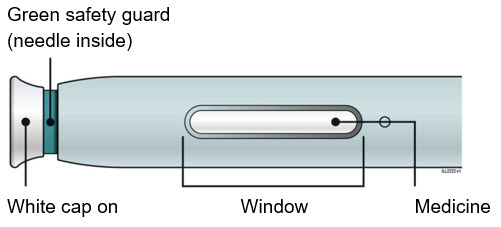
This is a description of a green safety guard with a needle inside and a white cap on. There is also a mention of a window and medicine, but without further context, it is unclear what this refers to.*
FDA Label Image

D Prepare And Clean Your Injection Site. (Enbrel 08)

FDA Label Image

E Pull White Cap Straight Off When You Are Ready To Inject. (Enbrel 09)

E  Pull White Cap Straight Off When You Are Ready To Inject. (Enbrel 09)
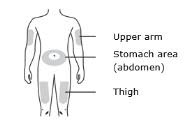
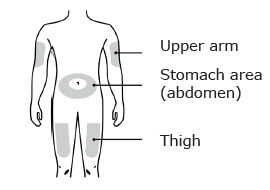
This text describes three different body parts: upper arm, stomach area/abdomen, and thigh. It may be relevant in a medical or fitness context.*
FDA Label Image

Window Turns Yellow When Injection Is Done (Enbrel 10)

FDA Label Image

Enbrel 100

FDA Label Image

Enbrel 101

FDA Label Image

Enbrel 102

FDA Label Image

Enbrel 103

FDA Label Image

Enbrel 104

FDA Label Image

Enbrel 105

FDA Label Image

Enbrel 106

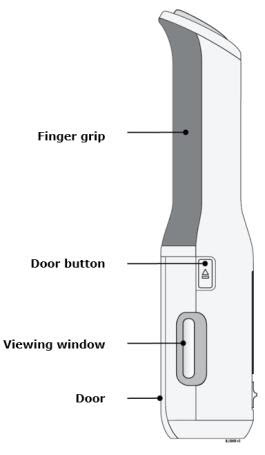
Enbrel 106
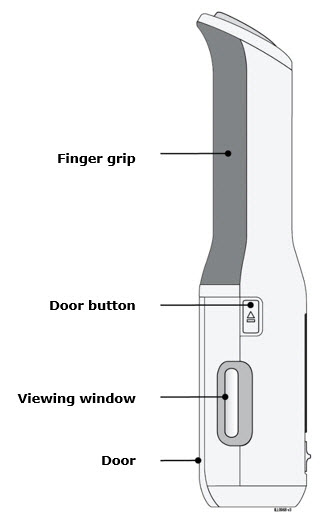
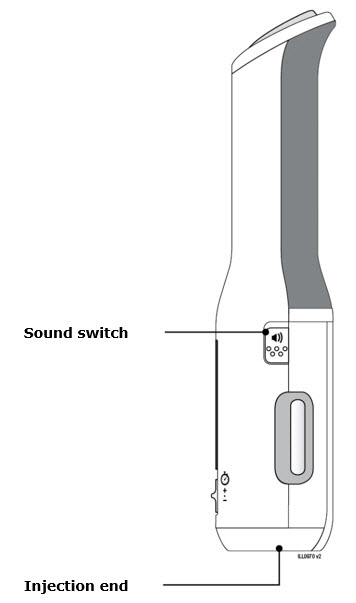
This text describes some features of an object that may be either a machine, equipment or appliance. It includes a finger grip, a door button, a viewing window and a door. The context is not specified, making it difficult to determine what type of object it is.*
FDA Label Image

Enbrel 107

FDA Label Image

Enbrel 108

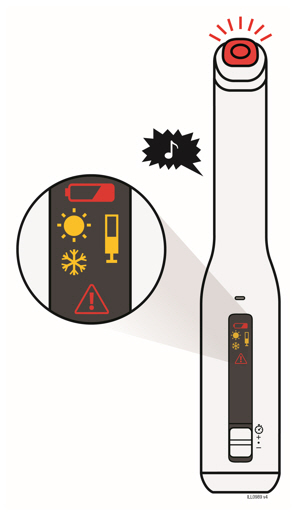
Enbrel 108
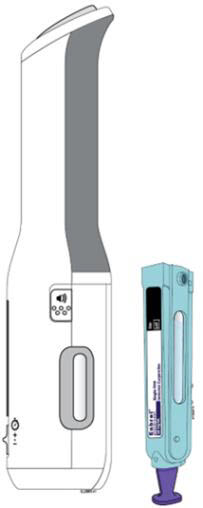
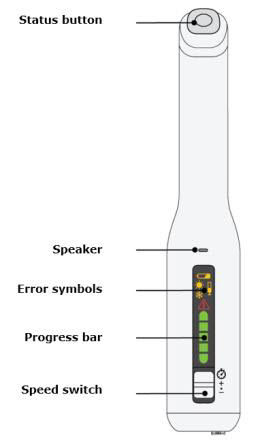
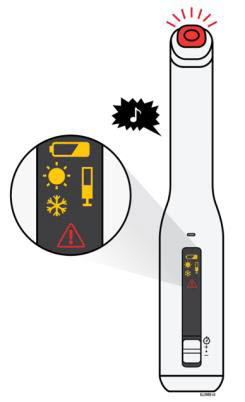
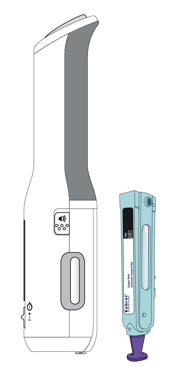
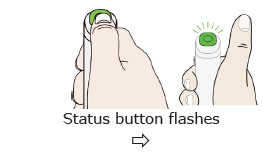
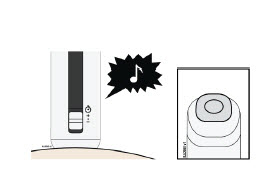
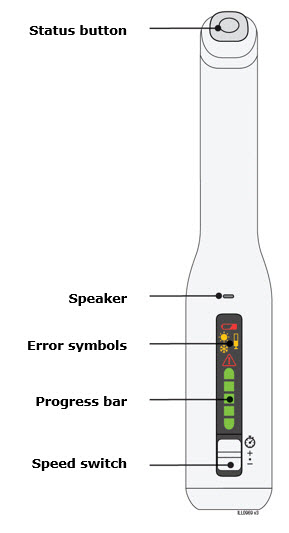
This appears to be a list of features or components of some sort of software or electronic device. The list includes a "Status button," "Speaker," "Error symbols," "Progress bar," and "Speed switch." Without further context, it is not clear what specific product or system this list relates to.*
FDA Label Image

Enbrel 109

FDA Label Image

Note: After You Remove Autoinjector From Your Skin, The Needle Will Be Automatically Covered. (Enbrel 11)

FDA Label Image

Enbrel 110

Enbrel 110
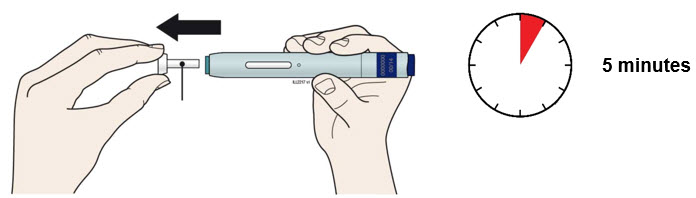
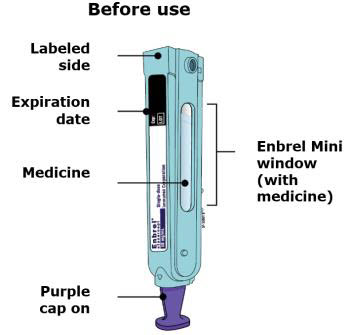
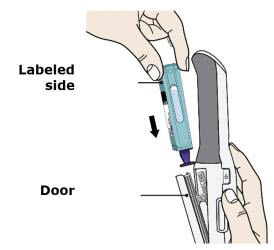
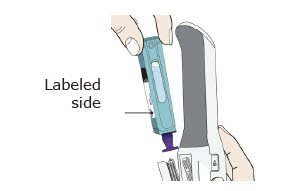
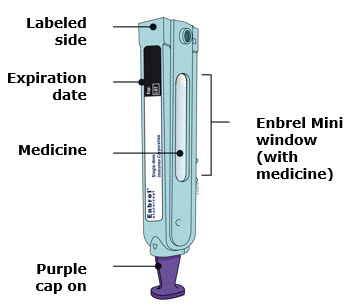
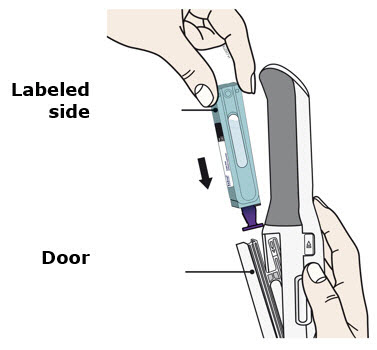
The text seems to be describing the instructions for using Enbrel Mini, a type of medicine with a purple cap. It advises users to check the label and ensure that they use the correct side, and to be conscious of the expiration date. However, without more information, it is difficult to tell what Enbrel Mini is used for or what specific instructions are associated with its use.*
FDA Label Image

Enbrel 111

Enbrel 111
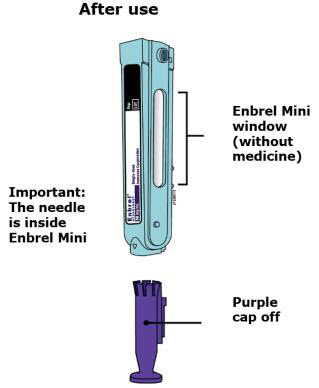
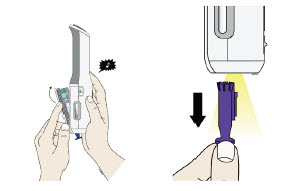
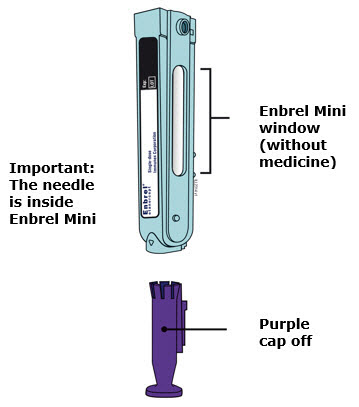
This appears to be a label or instructional text related to Enbrel Mini, a medication or medical device. The text warns that the needle is inside the product with the purple cap removed. However, there is no information regarding the purpose, dosage or usage instructions of the medicine itself.*
FDA Label Image

Enbrel 112

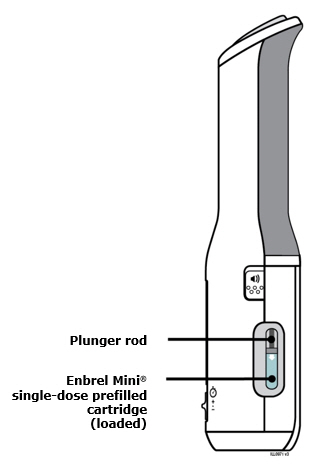
Enbrel 112
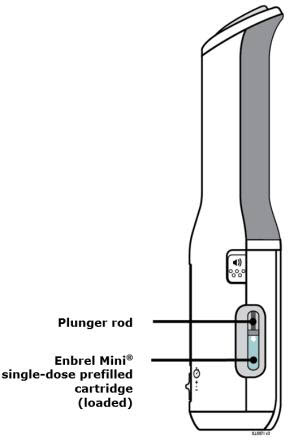
This text describes a plunger rod and a type of medication called Enbrel Mini, which comes in a single-dose prefilled cartridge.*
FDA Label Image

Enbrel 113

FDA Label Image

Enbrel 114

FDA Label Image

Enbrel 115

FDA Label Image

Enbrel 116

FDA Label Image

Enbrel 117

FDA Label Image

Enbrel 118

FDA Label Image

Enbrel 119

FDA Label Image

K Discard The Used Autoinjector And The White Cap. (Enbrel 12)

FDA Label Image

Enbrel 120

FDA Label Image

Enbrel 121

FDA Label Image

Enbrel 122

FDA Label Image

Enbrel 123

FDA Label Image

Enbrel 124

FDA Label Image

Enbrel 125

FDA Label Image

Enbrel 126

FDA Label Image

Enbrel 127

FDA Label Image

Enbrel 128

FDA Label Image

Enbrel 129

FDA Label Image

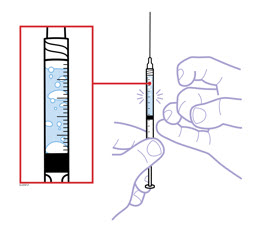
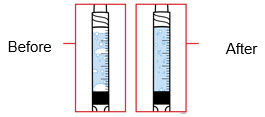
6. Hold The Prefilled Syringe With The Covered Needle Pointing Down. If Bubbles Are Seen In The Syringe, Very Gently Tap The Prefilled Syringe To Allow Any Bubbles To Rise To The Top Of The Syringe. Turn The Syringe So That The Purple Horizontal Lines On The Barrel Are Directly Facing You. Check To See If The Amount Of Liquid In The Syringe Falls Between The Purple Lines. The Top Of The Liquid May Be Curved. If The Syringe Does Not Have The Right Amount Of Liquid, Do Not Use That Syringe. Contact Your Pharmacist Or Call 1-888-4enbrel (1-888-436-2735) For Assistance. (Enbrel 13)

FDA Label Image

Enbrel 130

FDA Label Image

Enbrel 131

FDA Label Image

Enbrel 132

Enbrel 132
This is a list of three body parts: upper arm, stomach area (abdomen), and thigh.*
FDA Label Image

Enbrel 133

FDA Label Image

Enbrel 134

FDA Label Image

Enbrel 135

FDA Label Image

Enbrel 136

FDA Label Image

Enbrel 137

Enbrel 137
Not available.*
FDA Label Image

Enbrel 138

Enbrel 138
This is a list of features found in a device or object that include a finger grip, door button, viewing window, and door. The context or purpose of the object is not clear from the text provided.*
FDA Label Image

Enbrel 139

FDA Label Image

Step 2: Choosing And Preparing An Injection Site (Enbrel 14)

Step 2: Choosing And Preparing An Injection Site (Enbrel 14)
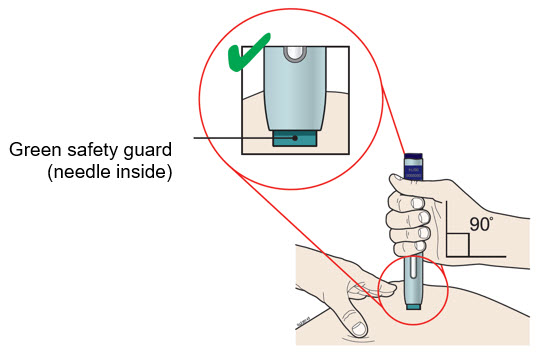
This text suggests that there may be a green safety guard containing a needle inside. It is unclear what the context or purpose of this guard may be.*
FDA Label Image

Enbrel 140

Enbrel 140
The given text describes some components or features that might belong to an electronic device. It includes a status button, a speaker, error symbols, a progress bar, and a speed switch. However, there is not enough context to determine the type, purpose or functionality of the device.*
FDA Label Image

Enbrel 141

FDA Label Image

Enbrel 142

Enbrel 142
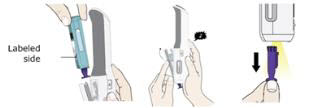
This appears to be a description of a medication called Enbrel Mini which has a purple cap and a window to view the medicine inside. The label and expiration date are also mentioned.*
FDA Label Image

Enbrel 143

Enbrel 143
The text seems to be part of a set of instructions for using a medical product, specifically for a device called "Enbrel Mini". It indicates that the needle is inside the device and that a purple cap needs to be removed before use. The purpose of the device and product is not clear without further context.*
FDA Label Image

Enbrel 144

FDA Label Image

Enbrel 145

FDA Label Image

Enbrel 146

FDA Label Image

Enbrel 147

FDA Label Image

Enbrel 148

FDA Label Image

Enbrel 149

FDA Label Image

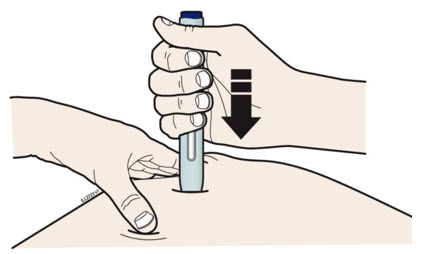
4. With A Quick And “dart Like” Motion, Insert The Needle At A 45 Degree Angle Into The Skin. (Enbrel 15)

FDA Label Image

Enbrel 150

FDA Label Image

Enbrel 151

FDA Label Image

Enbrel 152

FDA Label Image

Enbrel 153

FDA Label Image

Enbrel 154

FDA Label Image

Enbrel 155

FDA Label Image

Enbrel 156

FDA Label Image

Enbrel 157

FDA Label Image

Enbrel 158

FDA Label Image

Enbrel 159

FDA Label Image

One Prefilled Diluent Syringe Containing 1 mL Of Diluent (liquid) With Attached Adapter And Twist Off Capone Plungerone Enbrel Vialone 27 Gauge ½ Inch Needle In Hard Plastic Coverone Vial Adapter (Enbrel 16)

FDA Label Image

Enbrel 160

FDA Label Image

Enbrel 161

FDA Label Image

Enbrel 162

FDA Label Image

Enbrel 163

FDA Label Image

Enbrel 164

FDA Label Image

Enbrel 165

FDA Label Image

1. Remove The Pink Plastic Cap From The Enbrel Vial. Do Not Remove The Gray Stopper Or Silver Metal Ring Around The Top Of The Enbrel Vial. (Enbrel 17)

FDA Label Image

3. Open The Wrapper That Contains The 27 Gauge Needle By Peeling Apart The Tabs And Set The Needle Aside For Later Use. (Enbrel 18)

FDA Label Image

Enbrel 180

FDA Label Image

Enbrel 181

FDA Label Image

Enbrel 182

FDA Label Image

Enbrel 183

FDA Label Image

Enbrel 184

FDA Label Image

Enbrel 185

Enbrel 185
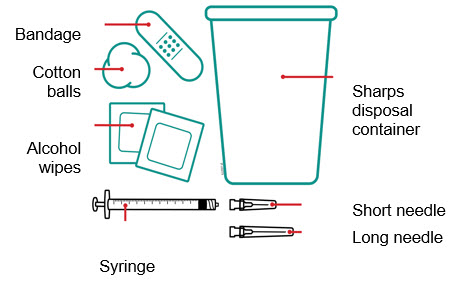
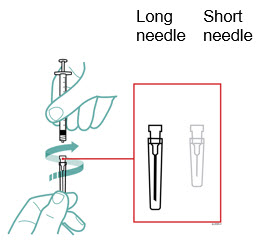
This text appears to be a list of medical supplies that includes bandages, cotton balls, a syringe, a sharps disposal container, and two types of needles: short and long. It could be helpful for individuals in the medical field or those in need of medical treatment who may require these items for wound care or medication administration.*
FDA Label Image

Enbrel 186

Enbrel 186
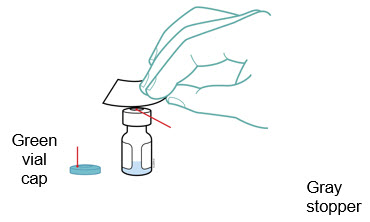
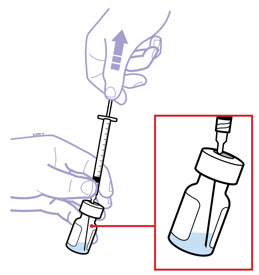
The text is not enough to generate a useful description. It only provides information about the color of a vial and the color of a stopper, but not the context or purpose of these objects.*
FDA Label Image

Enbrel 187

Enbrel 187
The text says "Long Short needie needle". It appears to be a list of two words related to sewing or stitching. "Long" and "Short" probably refer to the length of needles, while "needie" and "needle" are alternative spellings meaning the same thing.*
FDA Label Image

Enbrel 188

Enbrel 188
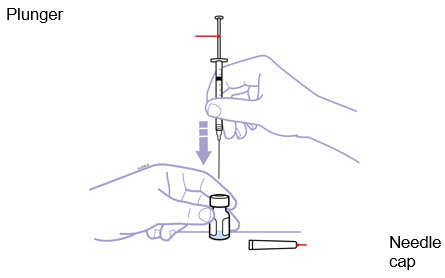
Plunger is a simple yet effective tool used for unclogging plumbing blockages. It features a rubber suction cup attached to a stick-like handle. When pressed onto a clogged drain or toilet, the suction cup creates a vacuum that dislodges the blockage and allows water to flow freely. Plungers are a common household item and are readily available at hardware stores.*
FDA Label Image

Enbrel 189

FDA Label Image

4. Open The Wrapper That Contains The Vial Adapter By Peeling Apart The Tabs And Set The Vial Adapter Aside For Later Use. Do Not Touch The Vial Adapter’s Twist On End Or The Spike Inside. (Enbrel 19)

FDA Label Image

Enbrel 190

FDA Label Image

Enbrel 191

FDA Label Image

Enbrel 192

FDA Label Image

Enbrel 193

FDA Label Image

Enbrel 194

* These product label images have been analyzed using experimental machine learning. Please verify findings with the primary label text.